Best Subtitle Formats Explained: SRT vs VTT vs ASS vs SUB
Complete comparison of subtitle formats. Learn when to use SRT, VTT, ASS, or SUB for your video projects.
Introduction
Choosing the right subtitle format is one of the most important decisions you will make when working with video content. The format determines where your captions can be used, how they appear, and what level of styling and positioning control you have. With four major formats — SRT, VTT, ASS, and SUB — each serving different purposes, it is easy to feel overwhelmed.
This guide explains every format in detail, compares their features side by side, and helps you choose the right one for your specific project. We also cover lesser-known formats like SSA, TTML, and DXFP so you can make an informed decision.
SRT (SubRip) — The Universal Standard
SRT is the most widely supported subtitle format. Every major video player, editing software, and streaming platform supports it. Created by the SubRip program in the early 2000s, the format uses a simple structure that has remained unchanged for decades.
Structure of an SRT file:
```
1
00:00:02,500 --> 00:00:05,000
Hello and welcome to our tutorial.
2
00:00:06,000 --> 00:00:08,500
Today we are going to learn about
subtitle formats and their uses.
```
Each entry consists of:
Strengths: Universal compatibility, simple plain-text format, small file size, easy to parse and convert, human-readable without special tools.
Limitations: No styling support (no bold, italic, colors), no text positioning, no metadata or chapter support, no animation or effects, no support for multiple text styles within a single entry.
Best for: Maximum compatibility, archiving, sharing, and as a master format for conversion.
Platform support: VLC, MPC-HC, PotPlayer, YouTube, Vimeo, Netflix, Plex, Kodi, iOS, Android, Windows Media Player (with codecs), and virtually every other media platform.
VTT (WebVTT) — The Web Standard
WebVTT was created by the W3C as the standard caption format for HTML5 video. It is the required format for YouTube and Vimeo, making it essential for web video publishers.
Structure of a VTT file:
```
WEBVTT
00:00:02.500 --> 00:00:05.000
Hello and welcome to our tutorial.
00:00:06.000 --> 00:00:08.500
Today we are going to learn about
subtitle formats and their uses.
```
Key differences from SRT:
Cue settings example:
```
WEBVTT
00:00:02.500 --> 00:00:05.000 position:10% line:80%
Hello and welcome.
```
The `position` and `line` settings place this subtitle at 10% from the left and 80% from the top of the screen.
CSS styling with ::cue:
```css
::cue {
background-color: rgba(0, 0, 0, 0.8);
color: white;
font-family: Arial, sans-serif;
font-size: 1.2em;
}
::cue(bold) {
color: yellow;
}
```
Strengths: Native HTML5 video support, CSS styling, cue positioning, chapter markers, metadata support, voice labels for speaker identification.
Limitations: Limited styling compared to ASS, CSS support varies between browsers, larger file size, no animation support.
Best for: Web video, YouTube upload, Vimeo, HTML5 players, online courses, corporate training videos.
Convert your files with our VTT to SRT or SRT to VTT tools.
ASS (Advanced SubStation Alpha) — The Professional Format
ASS is the most powerful subtitle format, supporting extensive styling, positioning, animation, and effects. It evolved from the SubStation Alpha (SSA) format and is widely used in the fansubbing community.
Features of ASS:
Example ASS entry:
```
Dialogue: 0,0:00:02.50,0:00:05.00,Default,,0,0,0,,{\b1}{\c&H00FFFF&}Hello{\b0} and welcome!
```
This renders "Hello" in bold with cyan color, followed by "and welcome!" in the default style.
Limitations: Poor web browser compatibility, complex syntax that is error-prone, larger file size, limited platform support (VLC, MPC-HC, PotPlayer), not supported on YouTube, Vimeo, or most streaming services.
Best for: Professional video production, anime subtitles, karaoke videos, projects needing visual effects, local community screeners.
SUB (MicroDVD) — Legacy Format
SUB is an older frame-based format used primarily by DVD players and legacy media players. Unlike SRT, VTT, and ASS which use time-based timestamps, SUB uses frame numbers.
Structure of a SUB file:
```
{0}{25}Hello and welcome to our tutorial.
{25}{50}Today we are learning about subtitle formats.
```
Each entry uses `{start_frame}{end_frame}` format. The frame numbers correspond to the video's frame rate, meaning a SUB file created for a 25fps video will not sync correctly on a 23.976fps video.
Strengths: Very simple format, small file size, supported by older DVD players and media centers.
Limitations: Frame-rate dependent (prone to desync on different versions), no styling, no positioning, limited modern platform support, no Unicode support in older implementations.
Best for: Archival purposes, legacy DVD content.
Fix for SUB files: Convert SUB to SRT for modern compatibility using our conversion tools. You will also likely need our FPS Converter to correct timing.
Other Subtitle Formats Worth Knowing
SSA (SubStation Alpha)
The predecessor to ASS. SSA supports styling and positioning but lacks advanced features like karaoke word-level timing, drawing commands, and some animation effects. Most SSA files can be used with ASS-compatible players.
TTML (Timed Text Markup Language)
An XML-based format standardized by the W3C. Used by Netflix, Amazon Prime, and other streaming platforms for professional caption delivery. TTML supports rich styling, positioning, and metadata but is verbose and not suitable for direct playback on most devices.
DFXP (Distribution Format Exchange Profile)
An earlier name for TTML. You may encounter DFXP files from legacy broadcast systems. Convert DFXP to SRT or VTT for modern use.
SBV (SubViewer)
A simple format used by YouTube's older caption system. Similar structure to SRT but uses different timestamp formatting. YouTube now prefers VTT.
Format Comparison Table
!Subtitle Formats Comparison: SRT vs VTT vs ASS vs SUB
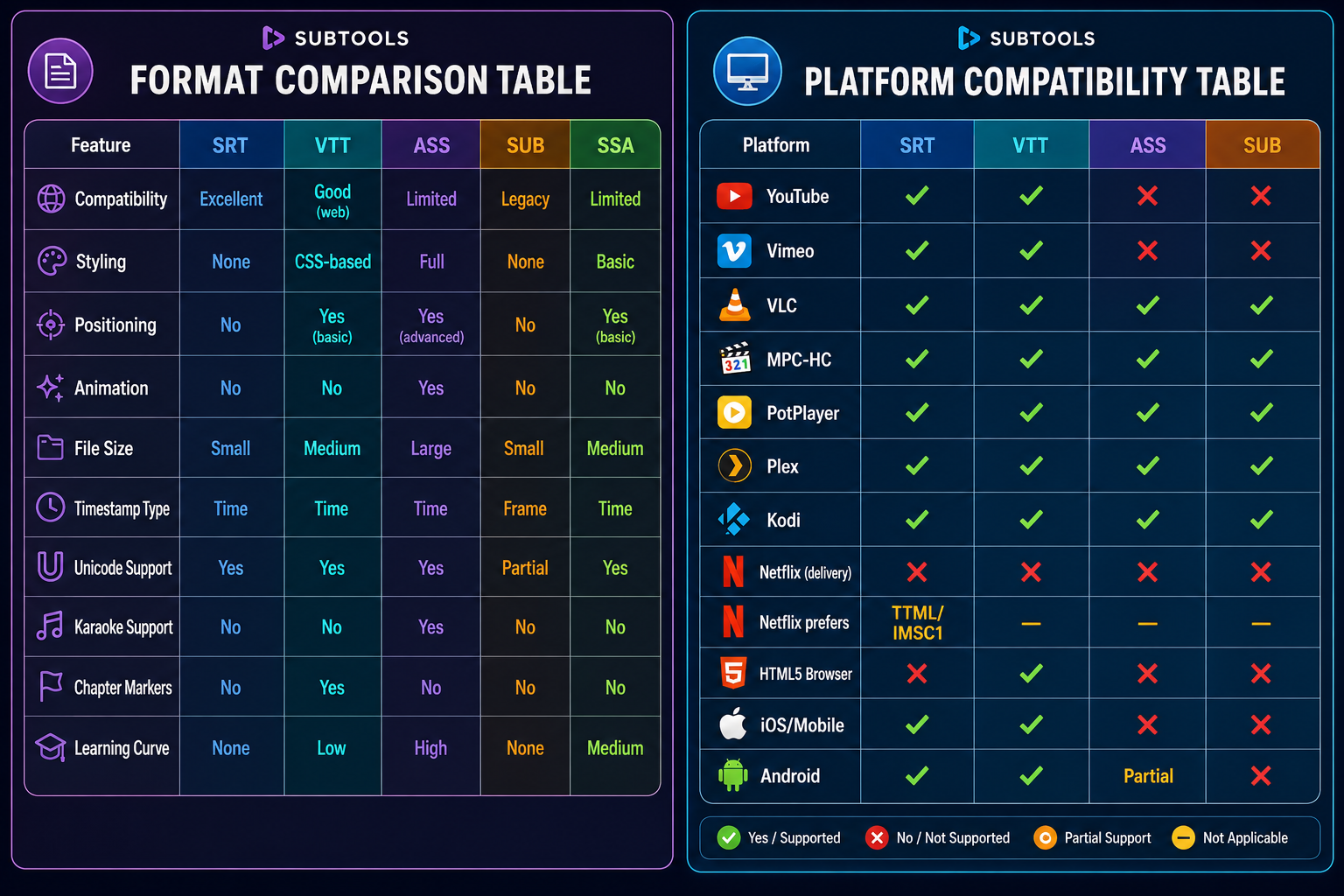
| Feature | SRT | VTT | ASS | SUB | SSA |
|---|---|---|---|---|---|
| Compatibility | Excellent | Good (web) | Limited | Legacy | Limited |
| Styling | None | CSS-based | Full | None | Basic |
| Positioning | No | Yes (basic) | Yes (advanced) | No | Yes (basic) |
| Animation | No | No | Yes | No | No |
| File Size | Small | Medium | Large | Small | Medium |
| Timestamp Type | Time | Time | Time | Frame | Time |
| Unicode Support | Yes | Yes | Yes | Partial | Yes |
| Karaoke Support | No | No | Yes | No | No |
| Chapter Markers | No | Yes | No | No | No |
| Learning Curve | None | Low | High | None | Medium |
Platform Compatibility Table
| Platform | SRT | VTT | ASS | SUB |
|---|---|---|---|---|
| YouTube | Yes | Yes | No | No |
| Vimeo | Yes | Yes | No | No |
| VLC | Yes | Yes | Yes | Yes |
| MPC-HC | Yes | Yes | Yes | Yes |
| PotPlayer | Yes | Yes | Yes | Yes |
| Plex | Yes | Yes | Yes | Yes |
| Kodi | Yes | Yes | Yes | Yes |
| Netflix (delivery) | No | No | No | No |
| Netflix prefers | TTML/IMSC1 | — | — | — |
| HTML5 Browser | No | Yes | No | No |
| iOS/Mobile | Yes | Yes | No | No |
| Android | Yes | Yes | Partial | No |
Format Decision Guide
Recommended Workflow
Common Conversion Mistakes
Conclusion
There is no single best subtitle format — the right choice depends on your target platform, styling needs, and audience. Keep an SRT master copy and convert to other formats as needed. Use our subtitle conversion tools to quickly switch between formats, and always test your subtitles on the target platform before publishing.
Browse our complete subtitle tool suite to clean, sync, convert, and optimize your subtitle files.